FairShare

Role:
UI/UX Designer
Project Type:
Mobile App
Tools:
Figma, Adobe Illustrator, Adobe Photoshop
Timeline:
January 2024 - Ongoing
Team:
4 Designers, 3 Developers (Jan-May 2023) 2 Designers 3 Developers (Current)
Links:
Overview

What is FairShare?

Fairshare is a mobile app designed to simplify shared expense management for young adults by enabling seamless bill splitting, expense tracking, and receipt scanning.

Fairshare was initially created as part of an interdisciplinary project at BCIT, bringing together four designers and three developers from the Digital Design & Development and Full Stack Web Development programs. Over time, it evolved into a passion project, now maintained by two designers and three developers who continue to refine and expand its features whenever time allows.

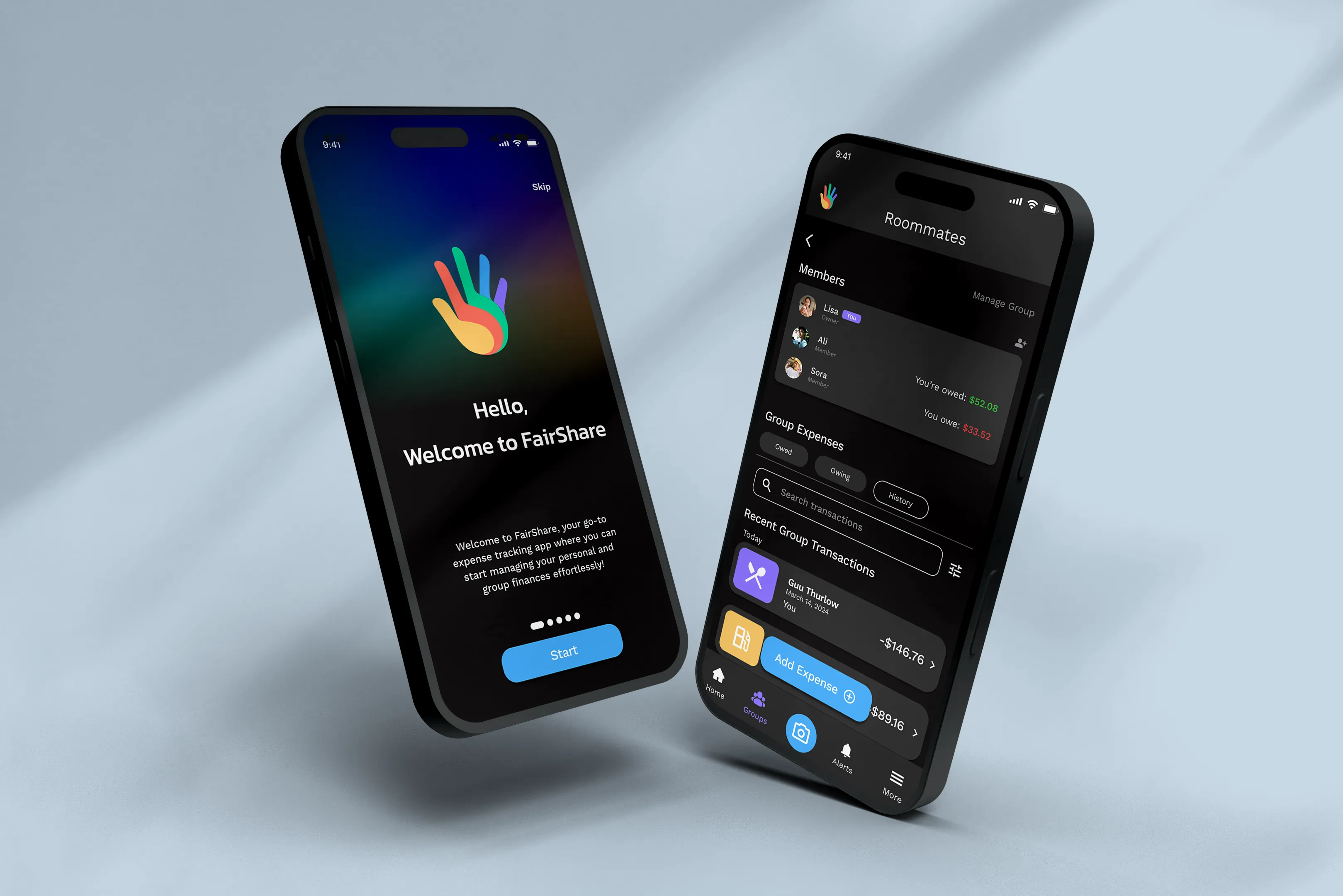
High-fidelity mobile app mockups showing FairShare’s onboarding screen and group expense dashboard in a dark-themed interface.
Ideation

How Can Managing Shared Expenses Be Less of a Hassle?

Early ideation explored several financial management concepts, including travel expense tracking, subscription management, and budgeting tools. While each addressed a valid need, research consistently pointed to shared expense management as a more frequent and underserved problem.

Approximately 15% of Canadians aged 20 to 34 live with roommates, and shared expenses are common in everyday situations such as group dining [1]. Existing tools often make it difficult to split costs fairly, especially when payments are uneven, turning routine moments into manual calculations and follow-ups.

Problem

Challenges in Shared Expense Management

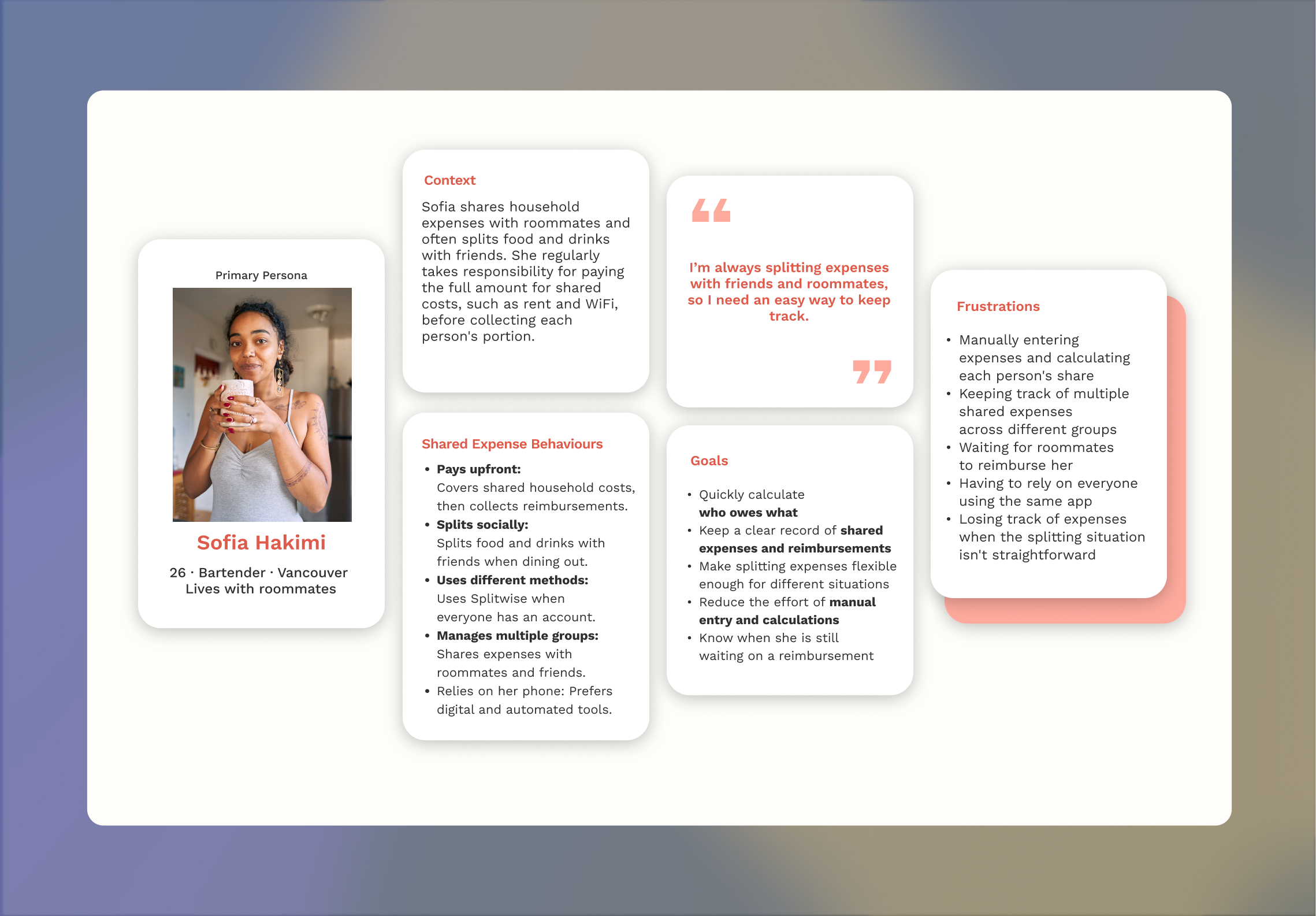
Young adults frequently share expenses with roommates, friends, or partners, yet managing shared costs often becomes complicated over time. Tracking who paid for what, splitting uneven bills, and keeping reimbursements clear can quickly turn routine situations into ongoing friction.

Group of young adults sitting together in a shared apartment, representing roommates as a key demographic for shared expense management.
15% of Canadians aged 20 to 34 live with roommates, and shared expenses are common in everyday situations
Research

Understanding Current Behaviors and Tools

Primary and secondary research showed that while shared expenses are common, existing tools make them difficult to manage consistently.

Participants described friction around uneven splits, tracking contributions across multiple expenses, and maintaining clarity as groups grow, while privacy concerns around bank connections limited comfort with automation. Reviews of popular expense-tracking apps reinforced these issues, citing rigid splitting logic, reliance on manual entry, and unintuitive navigation.

Gaps in Existing Tools

The consumer finance app landscape includes a wide range of tools for budgeting, tracking spending, and managing balances.

This table highlights a small subset of widely used tools that reflect common approaches to handling shared expenses

Tool
Primary Focus
Uneven Splits Support
Bank Integration
How Shared Expenses Are Handled
Splitwise
Group balances
Supported, but manual
Optional
Relies on manual entry and adjustments for complex splits
Mint
Personal finance
Not supported
Required
Shared expenses are secondary to individual tracking
You Need A Budget
Budget planning
Not supported
Required
Designed for personal budgeting, not group expenses

Key Insights

Synthesizing findings from user research and competitive review revealed several consistent patterns:

Manual Entry Breaks Consistency

Requiring users to calculate and enter expenses manually makes tracking tedious and easy to abandon.

Splitting Rules Don’t Match Real Life

Uneven payments, shared bills, and partial reimbursements are poorly supported.

Bank Connections Raise Trust Concerns

Hesitation around linking bank accounts prevents many users from using advanced features.

Early Flows Create Friction

Confusing navigation and onboarding make expense tracking feel more effortful than helpful.

My Role

UI/UX Designer

I contributed as a UI UX Designer with a focus on research, visual systems, and core interaction design.

  • Led user research through questionnaires, survey analysis, and secondary research, synthesizing insights that informed early structure and wireframes
  • Collaborated with co-designers to shape the visual system and brand expression, refining the style guide and reusable UI components
  • Owned the design and iteration of the bill splitting flow, including support for uneven expenses and group context
Solution

Flexible and Automated Shared Expense App

Fairshare was designed as a shared expense tool that reflects how group finances work in practice, rather than forcing users to adapt to rigid systems.

The solution focuses on:

1.

Flexible Expense Splitting

Supports uneven payments and shared bills, allowing costs to be divided in ways that reflect real scenarios.

2.

Reduced Manual Effort

Receipt scanning and streamlined entry help minimize repetitive calculations and tracking.

3.

Clear Shared Context

Shared expenses are organized by group, making it easier to see who paid, who owes what, and where things stand at a glance.

4.

Simple, Intuitive Flows

The interface prioritizes clarity and ease of use to support repeated, everyday interactions.

5.

Trusted Bank Integration

Fairshare uses secure third-party bank integration to support automation while being clear about data access.

Shared expenses aren’t one-time actions.

They’re ongoing, group-based experiences shaped by time, context, and trust.
Design Process

Story Mapping

Story mapping helped us understand how shared expenses unfold within Fairshare, from creating a group to tracking uneven expenses and settling balances over time.

Mapping these steps revealed that managing shared expenses is an ongoing, group-based experience. Users return repeatedly to check balances, add expenses, and settle up later, which informed how we structured screens and prioritized persistent context within the app.

Wireframes & Early Concepts

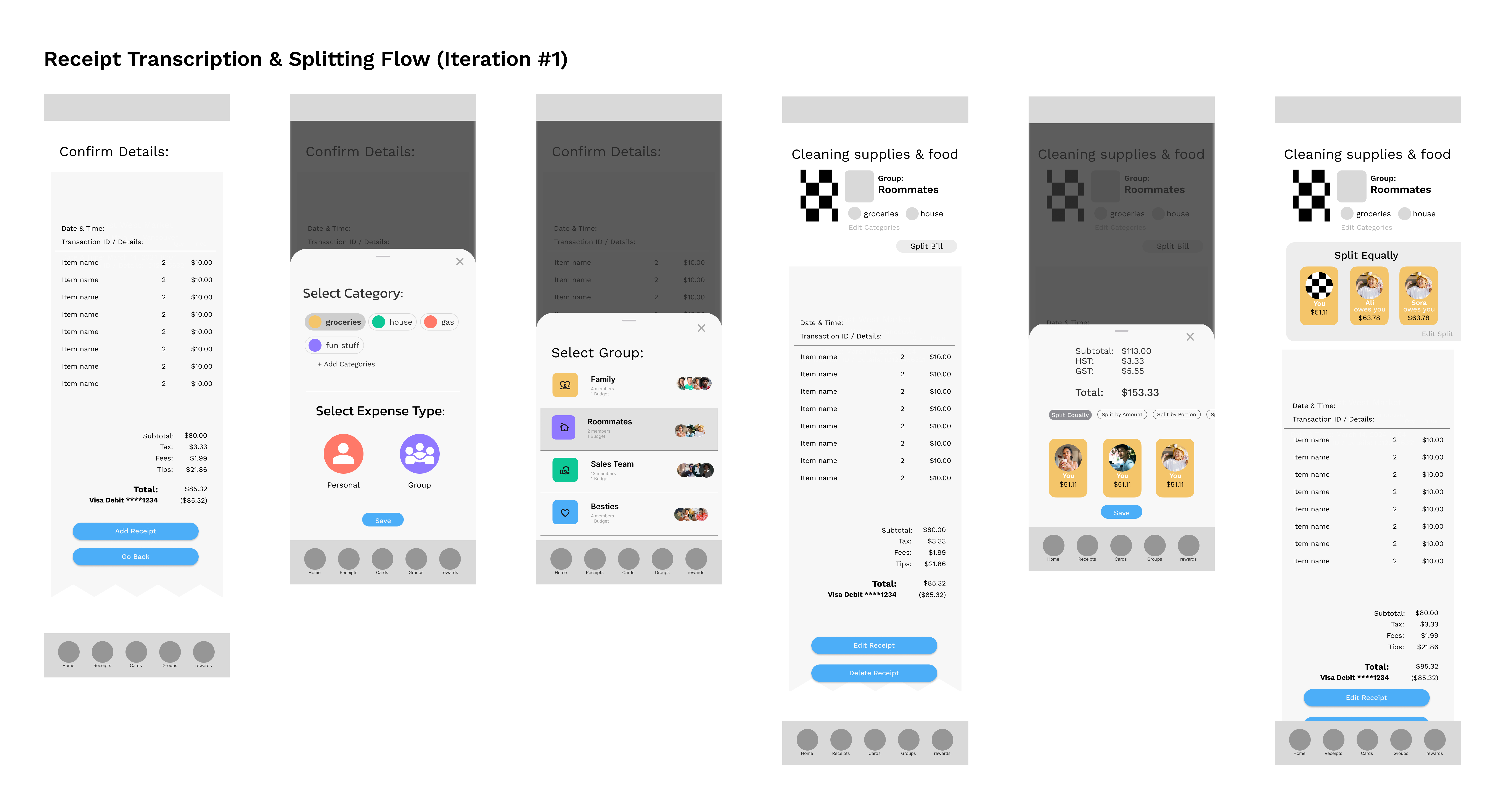
Low-fidelity designs were used to explore structure and flow before committing to visual design. Usability testing showed that while core features were understandable, certain multi-step actions such as splitting expenses and navigating within groups were unclear in early iterations.

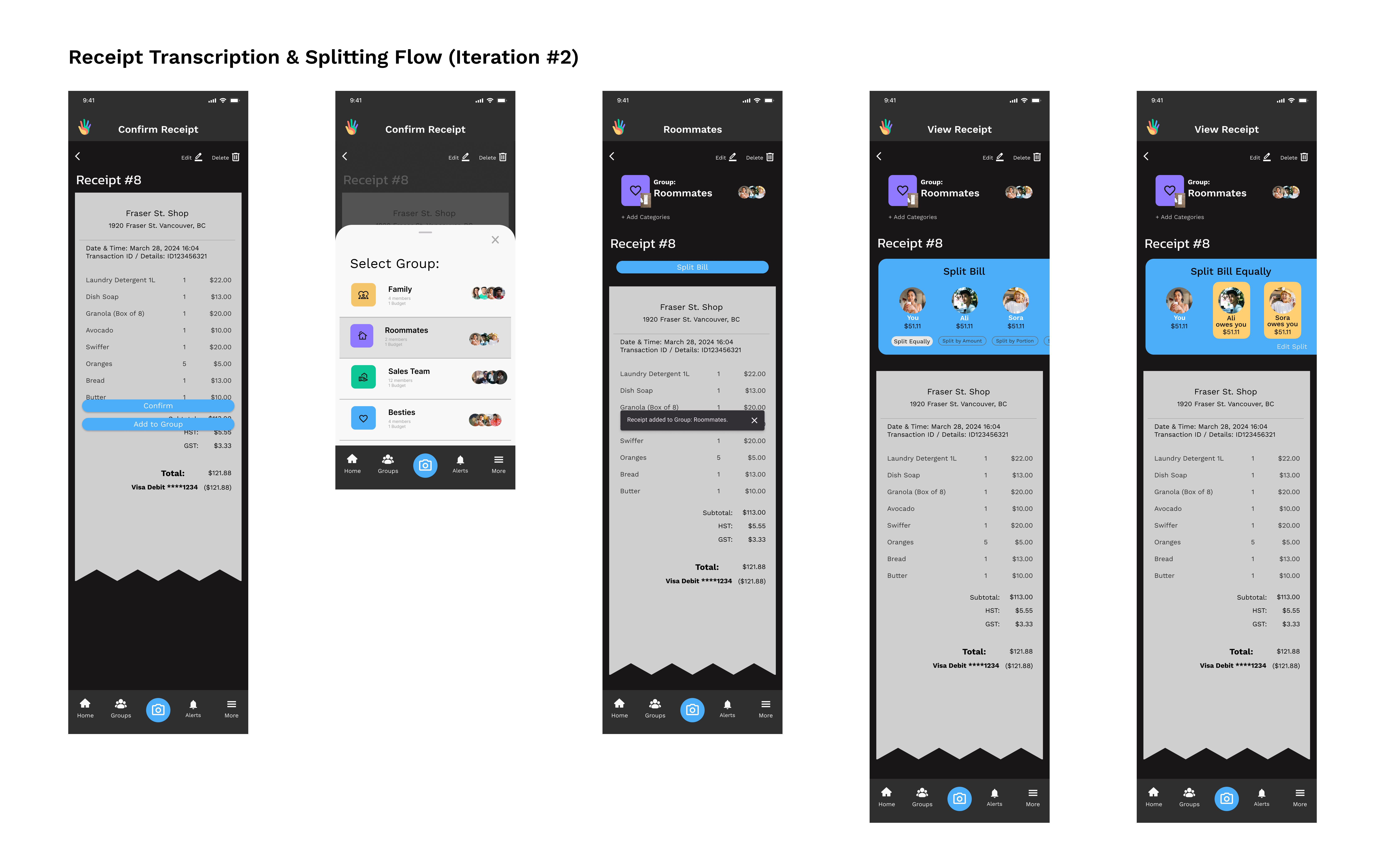
Based on testing feedback, high-fidelity designs focused on improving visual hierarchy, clarifying task order, and surfacing key group actions more clearly within the group context. These changes reduced confusion during shared expense flows and improved overall clarity without adding additional complexity.

Lo-Fi and Hi-Fi Wireframes
Low-fidelity wireframes exploring early layout and navigation for group expenses and bill splitting.
High-fidelity designs refining visual hierarchy, colour usage, and interaction patterns for shared expense flows.

Usability Testing

Task-based usability testing with five participants focused on key shared expense flows, including receipt scanning, bill splitting, and group reimbursements.

Key findings:

  • Early testing revealed friction in more complex flows such as uneven bill splitting and repayments, while most core tasks were completed successfully.
  • Confusion was primarily linked to visual hierarchy and task order rather than misunderstanding of the overall concept.
  • After high-fidelity refinements, participants completed shared expense flows with less guidance and greater confidence.

  • Receipt scanning and itemization were consistently identified as the most intuitive and valuable features.
Outcomes

Final UI Design

Moving from lo-fi to hi-fi design also involved refining scope to align with development priorities. Features and interactions were evaluated based on impact and feasibility, resulting in a focused MVP centered on shared expense management and bill splitting.

Home & Account Overview

Users can view linked account balances on the home screen, then dive into individual accounts to review transactions and spending categories through simple, visual breakdowns.

Mobile screens displaying linked bank accounts, recent transactions, and a visual spending breakdown by category.

Group-based Expense Management

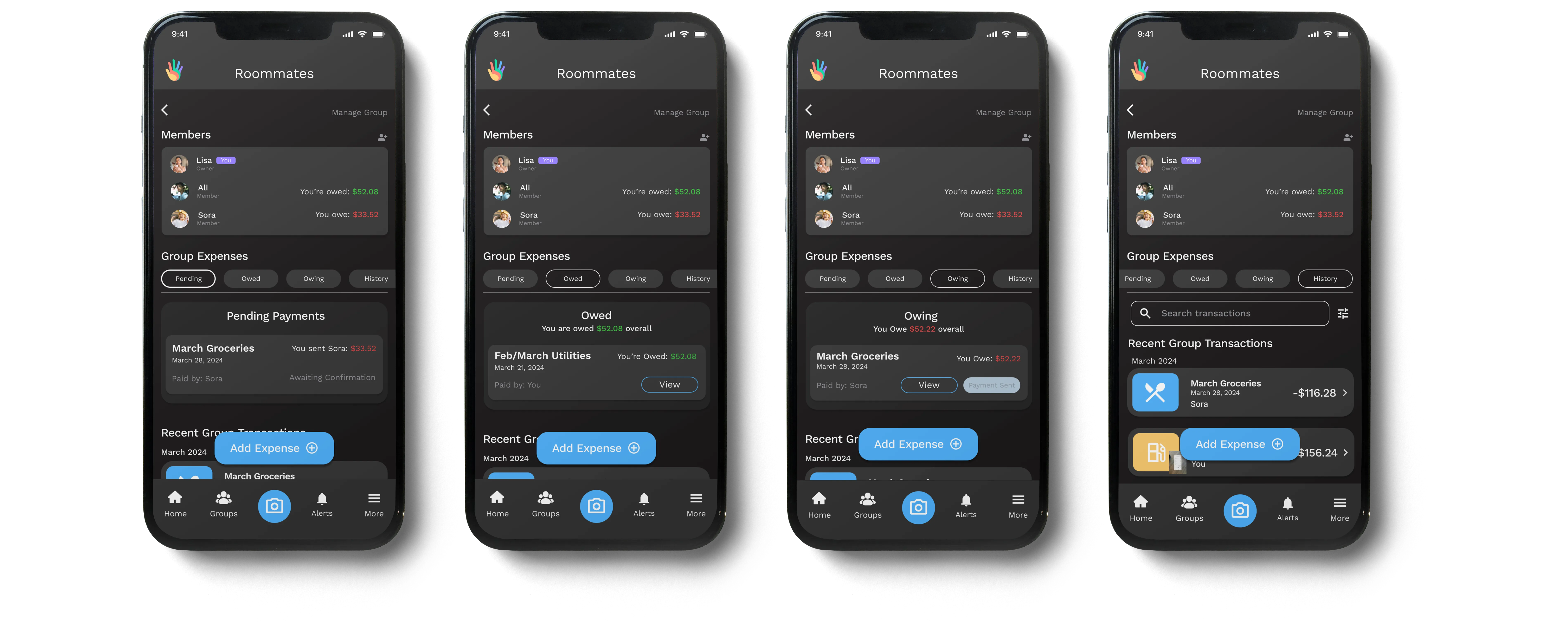
Groups are structured to support both ongoing and one-time shared expenses, with temporary groups resolving automatically once balances are settled to reduce clutter.

Within each group, the design prioritizes clarity and ease of use:

  • Member-level balances and colour cues show who owes or is owed at a glance
  • Filtered views separate pending payments, owed and owing states, and transaction history
  • Floating Add Expense action button enables quick, in-context receipt and expense entry

Group expense overview screens showing member balances, pending and settled expenses, and colour cues indicating who owes or is owed within a shared group.

Receipt Scanning

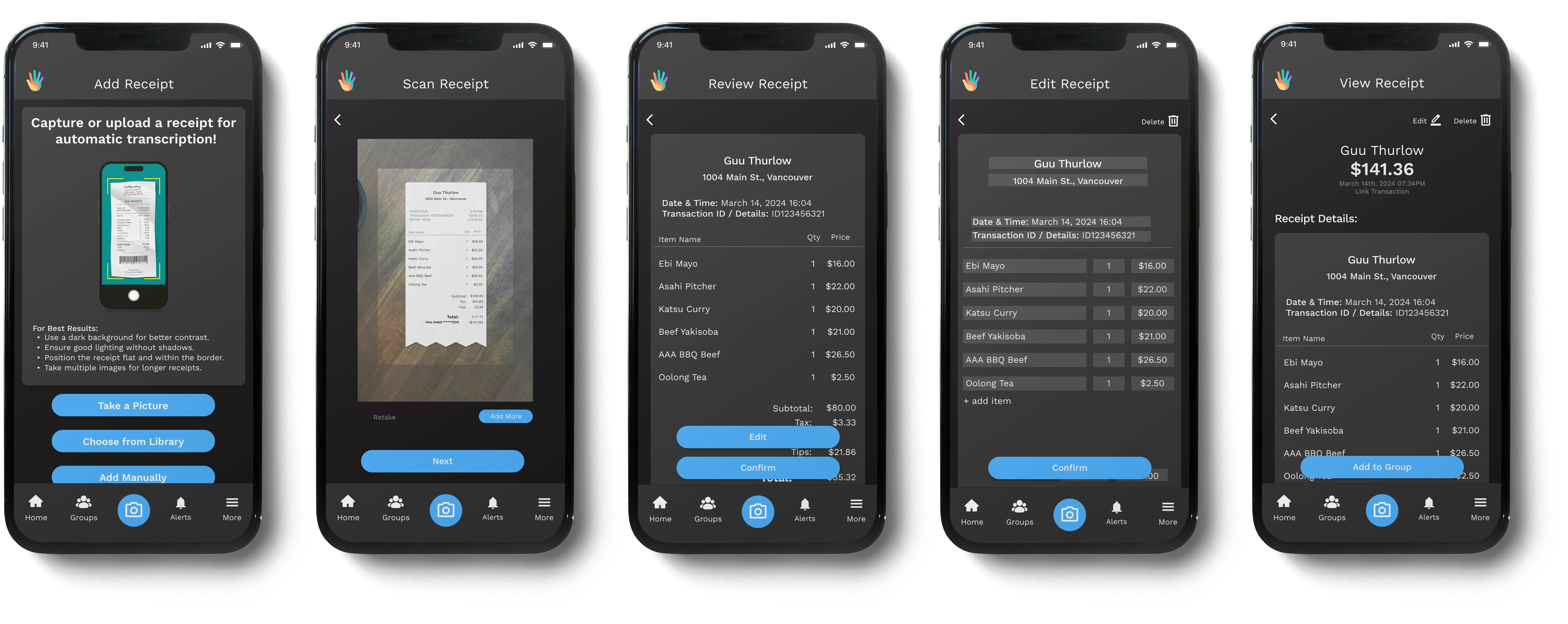
Receipts can be scanned, uploaded, or entered manually via the camera button in the nav bar. Automatic transcription speeds up data entry, while built-in review and editing steps give users full control before confirming expenses.

Step-by-step receipt scanning flow showing capture, automatic transcription, review, and editable receipt details before confirmation.

Adding Receipts to a Group

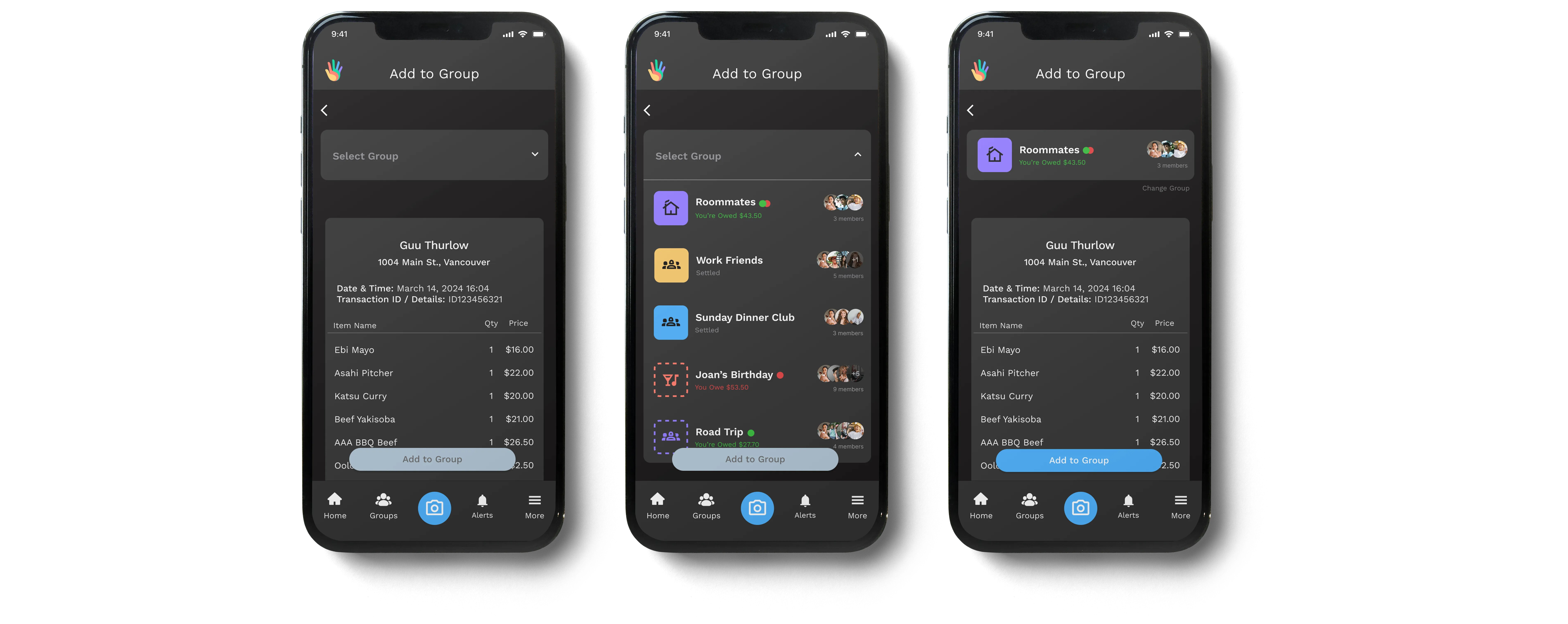
Receipts added outside of a group can be manually assigned to the correct group. The group selector reflects the Groups overview, displaying member information and balance states to support quick, confident selection.

Mobile screens showing a receipt being manually assigned to a group, with a dropdown list of groups displaying member avatars and current balance status.

Bill Splitting Options

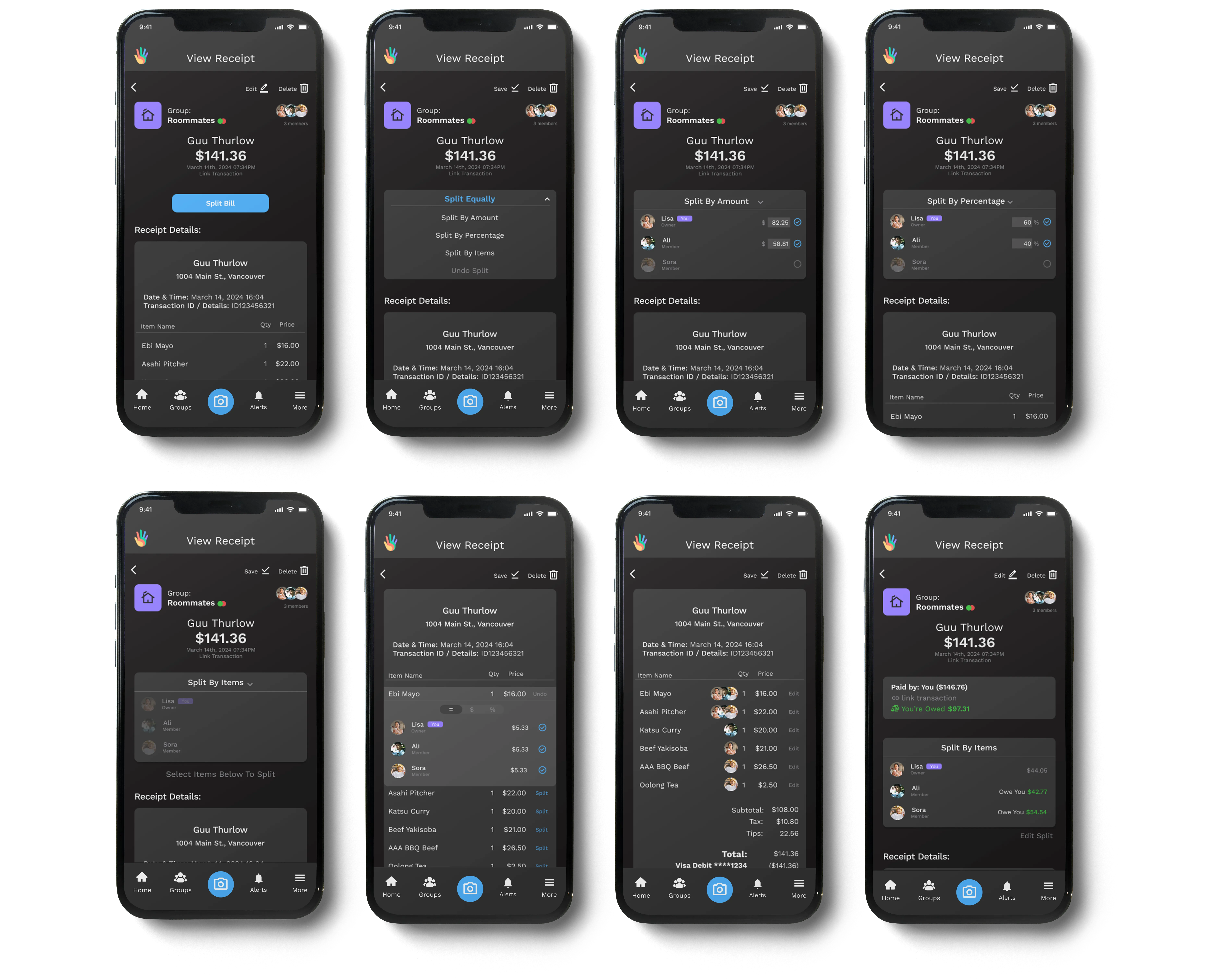
Once a receipt is added to a group, users can split the total in a way that reflects how the expense was shared. Whole-bill splits support equal, custom amount, and percentage options, with the ability to select only the members involved in the expense rather than the entire group.

After splitting, a clear summary card surfaces what each member owes or is owed, giving users immediate confirmation before moving on.

Mobile screens showing multiple ways to split a group expense, including equal splits, custom amounts, and percentage-based allocation among selected members.

For more precise control, users can split expenses by individual items, assigning items to specific members while tax and tip are distributed proportionally. Assigned items are reflected directly on the receipt using member avatars, making responsibility clear at a glance.

These options support common real-world scenarios while keeping the flow lightweight and easy to adjust before confirming.

Mobile screens demonstrating item-level bill splitting, where individual receipt items are assigned to specific group members with proportional tax and tip distribution.

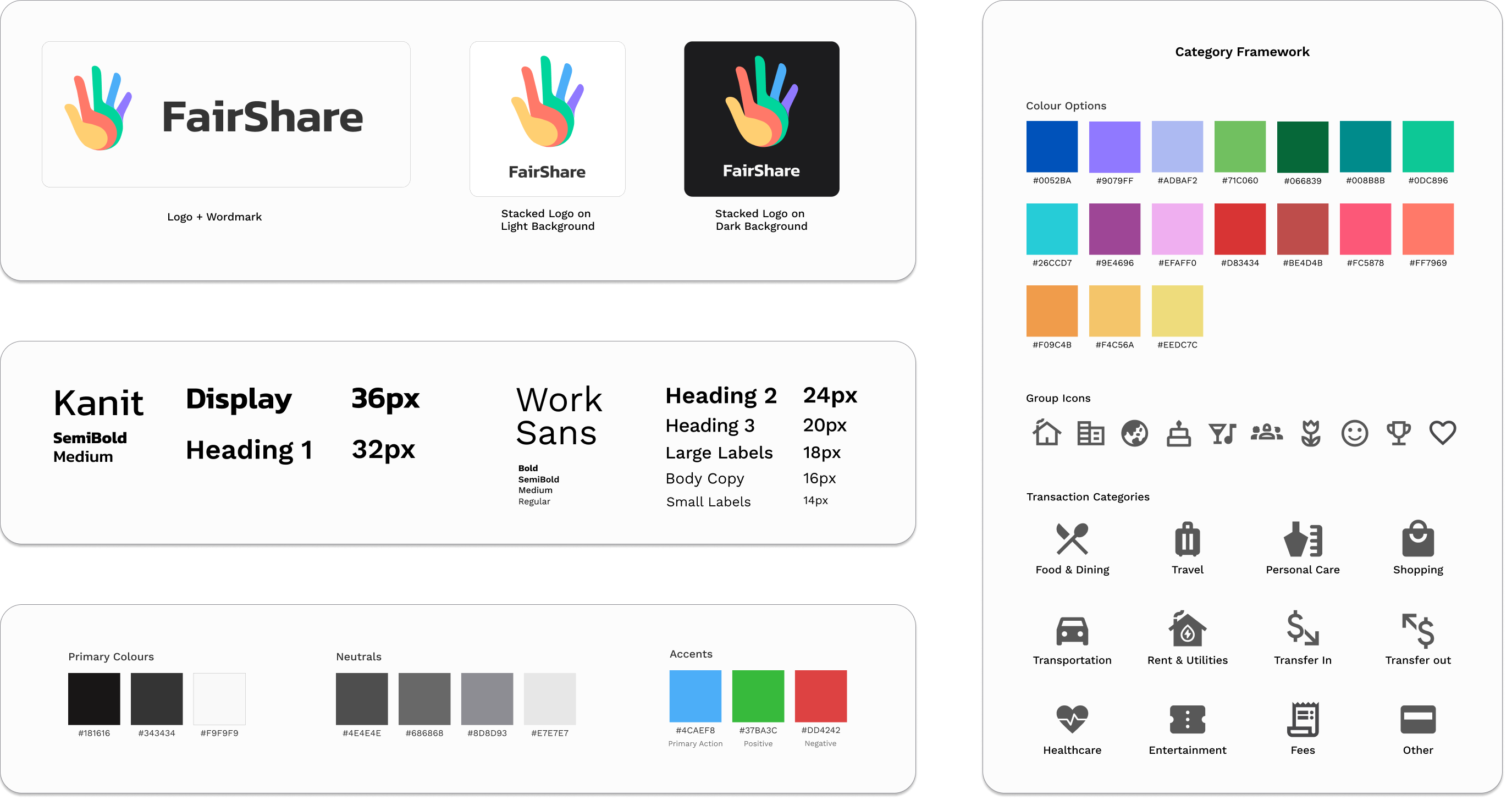
Visual Design Foundations

A restrained dark palette and clear typographic hierarchy were used to reduce cognitive load when working with financial information. Neutral tones create a calm baseline, allowing key values and actions to remain easy to scan and understand.

Visual design foundations showing FairShare’s logo usage, typographic hierarchy, and core colour palette.

Category System

An expanded set of accent colours and category-based icons reflects transaction types commonly recognized by financial institutions. Colour and iconography work together to support quick recognition of expenses at a glance while maintaining overall visual consistency.

Transaction category system using colour and iconography aligned with common financial classifications.
Lessons Learned

Designing for Handoff and Implementation

Simple flows hide real complexity.
What initially appeared to be a straightforward bill splitting experience became more nuanced once uneven payments, shared responsibility, and delayed reimbursements were considered. Designing for these scenarios required questioning assumptions about how people actually manage money together.

Scope is a design tool.
Reducing scope was less about removing ideas and more about identifying what needed to work reliably. Focusing on a small set of core interactions helped the product remain clear while staying feasible to build.

Context mattered as much as visuals.
Designing alongside development team highlighted the importance of communicating intent and interaction details beyond what was visible on screen. Understanding technical limitations early helped guide revisions while preserving key UX decisions.

⇱ view project